Bétonnière

De Foxhole Wiki
Aller à la navigation Aller à la recherche
Cette page est intemporelle et devrait être exacte pour toutes les versions de Foxhole.
Cet article est considéré comme exact pour la version actuelle (1.60) de Foxhole.
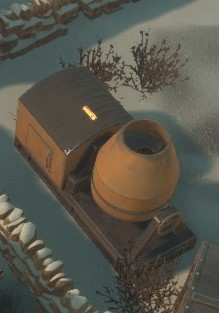
Un dispositif portable qui mélange divers matériaux pour former du béton, qui est utilisé pour construire des structures lourdement fortifiées.
In-game description

La Bétonnière est une structure expédiable qui convertit les Composants en Béton pour la construction des défenses très fortifiées.

Production

Structure Input(s) Output Temps
MapIconConstructionYard.png Chantier de Construction75 x Matériaux Raffinés RefinedMaterialsIcon.png
Bétonnière ConcreteMixerIcon.png75 coups de Marteau
MapIconMassProductionFactory.png Usine de Production de Masse225 x Matériaux Raffinés RefinedMaterialsIcon.png
Caisse de 3 x Bétonnière ConcreteMixerIcon.png01:02:30

It must be fully researched in the Weapons and Structure IconFilterWeaponsStructures.png Tech Tree in order to be produced.

Mass Production Factory orders must have at least 3 crates.

Reservation

It can be reserved for a Squad BtReserve.png to prevent non-members from modifying it, however it doesn't prevent packaging and the stockpile access is not restricted.

Destruction

It is immune to Friendly Fire but it can be flagged for "Disruptive Structure Placement" BtRemove.png to remove the immunity (5 "votes" needed).

Structure Event Log

In its interface you can click the "View Actions Log" button BtLog.png to view a list of recent events, with timestamps and player names displayed. Events recorded include modifications and production orders. The log only displays the last 128 events (8 pages). It is also cleared if packaged and unpackaged.

Use

It can be interacted either on foot or while driving a logistic vehicle by pressing E.

Concrete Production

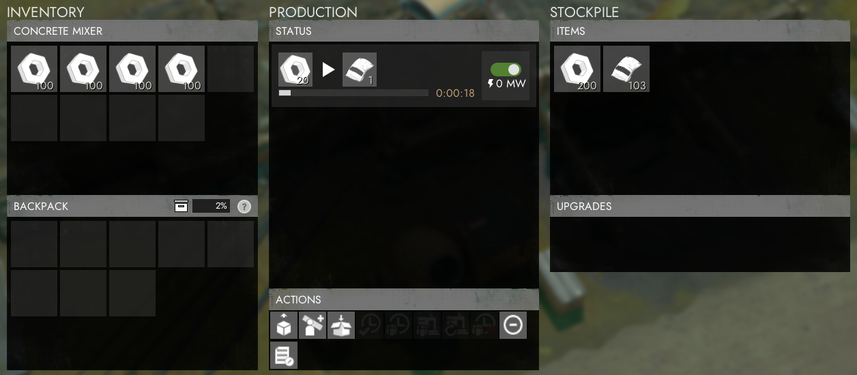
A production order can be started by clicking the slide-toggle button on the desired production line: ProductionToggleActive.png green means on, ProductionToggleInactive.png red means off, and ProductionTogglePaused.png yellow means paused. You can read the reason for the pause by putting your cursor on the slide-toggle button.

A player can only have one order running at a time at a given facility, however up to 5 orders from different players can run concurrently. The amount of active orders is shown at the top. If the limit is reached the subsequent orders are placed in a hidden queue.

Orders can be set to "Public" or "Personal" via the drop-down button at the top:

  • Public: The inputs are automatically taken from the public stockpile. The output is automatically submitted into the stockpile.
  • Personal: The inputs are manually transfered by the player by clicking. Output is placed into a private output slot that holds the items for the player whilst production is underway. The output items can be retrieved with RMB > "Retrieve". If not retrieved, personal outputs are released into the public stockpile 28 hours after the order is complete.

Put your cursor on the "Facility Recipe" button FacilityRecipeIcon.png on the production line to view the exact recipe.

Recipe:

Input(s) Output(s) Temps
(hh:mm:ss)
20 x Composants ComponentsIcon.png
1 x Béton ConcreteBagIcon.png
00:00:20

When it is processing, the 'barrel' of the structure will tilt to the side and begin spinning, when its not processing, the 'barrel' will be pointing upwards.

A Resource Container full of Components takes roughly 1 hours and 23 minutes to fully complete, making 250 Concrete Materials in total.

Storage

Its stockpile can hold up to 32000 Components and 32000 Concrete Materials, while every personal production can hold 2400 Components in the input slot and 120 Concrete Material in the output slot. The production automatically halts when those limits are reached.

In its interface, you can press the Stockpile Actions Log BtLog.png button to view the logs of items retrieved from and submitted to the stockpile.

Transport

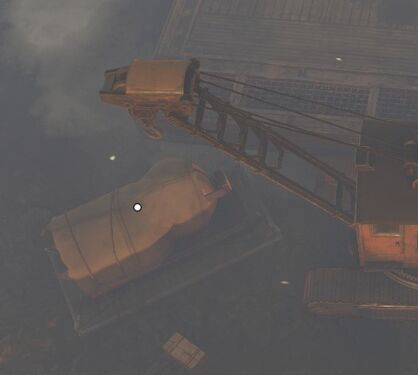
As a small shippable, it can be packaged but only if its stockpile and inventory are empty and if there are no items stored in a personal production orders' input or output slots. Once packaged, it can be lifted by a Crane and placed on any Shipping Vehicle for transport. While on a vehicle you cannot interact with it. You will require another crane at your destination to lift the container from the vehicle. To unpackage it simply press E.

When empty it can be stored at a Storage Depot or Seaport.

Like every other player made structures, it can decay after a while if left on the ground.

Trivia

  • Prior to Update 1.50 (officially known as 'Inferno'), the Concrete Mixer was the only way to make Concrete Materials
  • In Update 1.52, the Concrete Mixer's menu was changed to accommodate the change with Concrete Materials, allowing players to decide whether or not the Concrete Mixer can produce materials (in a similar fashion to Facilities)

Galerie